|
|
|
What is Adobe doing?
|
|
Adobe has posted a possible fix to this issue.
You can find it here.
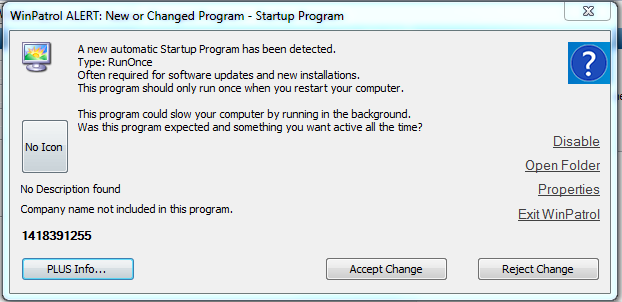
In the last couple of days I've been getting loads of email from WinPatrol customers asking what is this strange new start-up program?
The name is only numbers and no matter how many times I try to block or disable it, it just keeps coming back.
I noticed that on every machine the number was different. Even on my computer, the number was different every single time,
almost like it was either trying to elude being blocked or was a tracking number of some kind.
Then I received an email from a customer
who had discovered this mysterious program is actually "Adobe Speed Launcher". I had not agreed to install this, so I was a bit confused as to it purpose.
So, I took the plunge and let it run on one of my test machine.
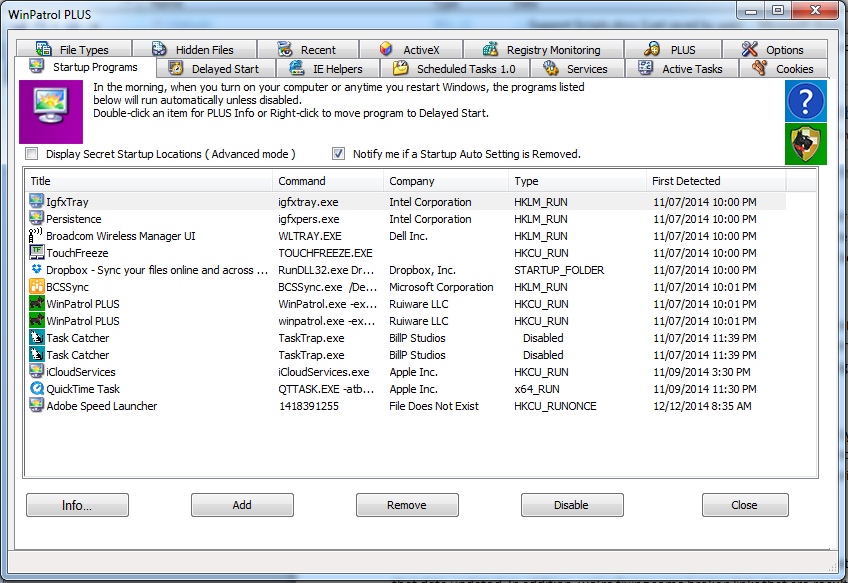
After letting it run, I saw the below entry for Adobe Speed Launcher was added as a "Run Once" start-up program. Considering this is a RunOnce, my assumption was it would be installing the full-blown
"Adobe Speed Laucher" on next system start-up. Now I was curoius.
I have come this far, lets reboot and see what happens.
After rebooting, I was waiting for a pop-up installing some new software, but nothing.
Nothing at all... Interesting.
While waiting I did some investigation and realized that
my local copy of Adobe Reader had been upgraded the day before. Now the pieces are all falling into place.
I was allowing Adobe to automatically update itself in an effort to protect my system
better because as we all know, Adobe has had quite a few vunerabilities over the years.
Giving Adobe the benefit if the doubt, I was thinking to myself that one pop-up is not that bad.
Then up came 2 more.
This time for a new number.
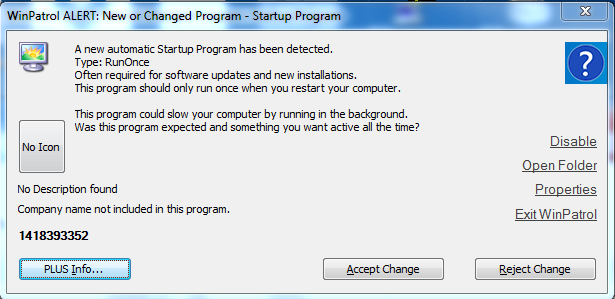
Frustrated at this, I opened Adobe Reader to see if there was a setting for disabling Adobe Speed Launcher.
I could not find one.
Now I was becoming annoyed with Speed Launcher, so I did some research online.
From what I have read Adobe Speed Launcher was created in order to make Adobe Reader start-up more
quickly when you use it. On the surface this sounds good, but I only use Adobe Reader once a month, if that.
Why do I want it to take up system resources in pre-loading files every
single time I start my computer when I will most likely not be using it anyway?
Now, if they had accomplished the restart of Speed Launcher in a better, more non-obtrusive way, I may not have even noticed it for a while. But, adding new RunOnce keys every time
a computer is restarted is a somewhat questionable practice more fitting for adware than a product I want installed on my computer.
Therefore, because I could not figure out a way of easily disabling Adobe Speed Launcher, I decided to complete remove Adobe Reader XI instead.
The annoying pop-ups have stopped.
The next time I need to read a PDF,
I will find a reader that is written in a more user-friendly way.
Thank you for reading,
Bret
|

Bits From Bill
Read thoughts leaking from the brain of developer Bill Pytlovany
|