WinPatrol Beta Headquarters

Beta Instructions
-
Thank you for your interest in testing WinPatrol version 16
This version is provided AS-IS and does not represent a fully verified software product. Using this version of WinPatrol is at your own risk.
This is "rolling" beta test which means new builds will be available on a weekly basis. You'll want to return to this page to find new versions of the beta at least weekly.
-
Requirements: Actually read the information provided on this
page. It's not like it's some kind of EULA but you should be aware of what's
changed.
Beta Tips
-
It's always a good idea to create a restore point of your system before
installing any new software. While I'm confident there's no real dangers
expected I recommend you back up any important data and create a restore point
for your system before installing any new software.
I love screen shots. If you have problems or suggestion you'd like to report sending a screen shot can save us both multiple Emails. To capture the current window hold down the Alt key and press PrntSrn key. This will copy the top window into the clipboard as an image. Just Paste the image into your favorite photo program and Email that file to support@winpatrol.com.
What's New
2009-02-01 16.0.2008.b3-
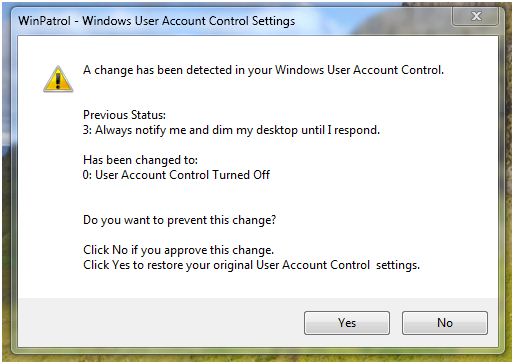
Added Monitoring of UAC settings
-
Fixed truncation and missing international text
-
Fixed History Button Crash
-
Fixed Host File truncation in HiJack Log
- Fixed ActiveX Prevent Changes Selection on Hide Alerts Dialog
- Dutch version released
-
Windows 7
This version is the first specifically designed to work with Windows 7. If you're a Windows 7 user you're welcome to use this beta and report your experience. Many Windows 7 specific features are still being developed and may not be available until Microsoft has officially launched Windows 7..
-
User Access Control
This version was created to provide all the WinPatrol functionality you've come to enjoy even on a Windows Vista and WinPatrol 7 machine.
There are two versions of the small WinPatrol monitor component. One requires UAC permission, one does not.
Initially, the non-UAC version will run so you don’t have a UAC alert every time you reboot. If however, a change is detected and WinPatrol needs permissions we’ll swap the WinPatrol monitor with the one which requires UAC..
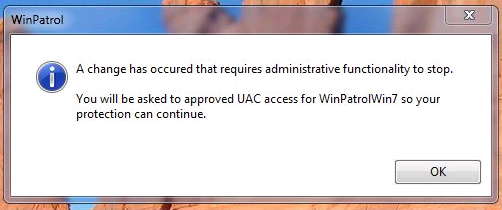
As seen on a Windows 7 machine -
Hide Alerts
The 2nd big change is a long time request. Many users have wanted to configure WinPatrol so that alert messages may be hidden from users. Typically, this has been requested by IT managers or parents but it may also be handy to regular WinPatrol users. This will be a bonus feature available only to supporters who have upgraded to PLUS.
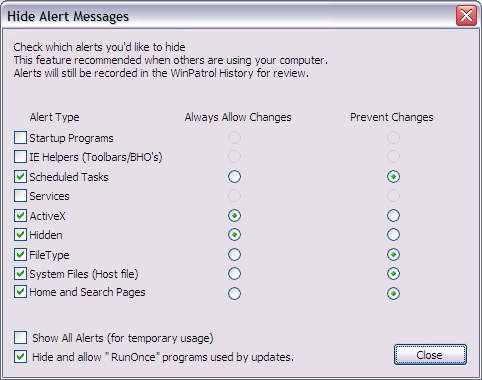
As seen on a Windows XP machineI’ve also thrown in a feature which ignores “RunOnce” changes to the registry. I have never seen malware use this entry alone and it’s often used by legitimate and frequent updates. If you’re setting up a system for someone else this might be an option you’ll want to use.
Thank you for your support!
 Download
WinPatrol Version 16.0.2008.b3
Download
WinPatrol Version 16.0.2008.b3
 WinPatrol v16 Brazil Beta2
Final version will be 16.0.2009 .0
Good things to know...
-
We recommend you install this new version in the same folder you're currently
using and preserve your settings. Depending on your current version, you may
need to UnInstall your current version using the Add/Remove Programs applet in
the Control Panel.
Prior Release Notes
- WinPatrol 15.5.2008
- WinPatrol 14.0.2007
- WinPatrol 12.2.2007
- WinPatrol 11.3.2007
- WinPatrol 10.0.5.0
- WinPatrol 9.8.1.0
- WinPatrol 9.7
- WinPatrol 9.5
- WinPatrol 9.x
- WinPatrol 8.x
- WinPatrol 7.0
- WinPatrol 6.5


Copyright
© 2007-2009 BillP Studios
All Rights Reserved.