
The newest feature of WinPatrol will greatly accelerate your system startup time. While WinPatrol 2007 has been improved in many ways our favorite new feature is called "Delayed Start". You probably have programs which you do want running in the background but you don’t need to launch immediately on boot up. WinPatrol’s Delayed Start allows you to specify the time to wait before launching programs which may typically try to load while other system initialization are happening. -
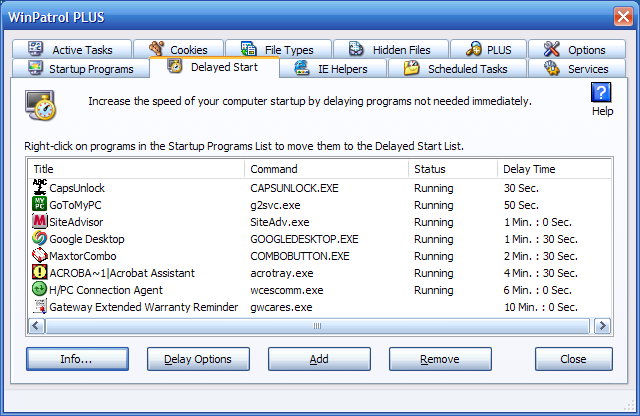
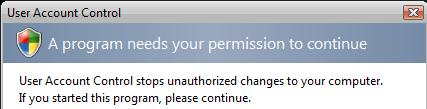
I'm pleased to say WinPatrol runs great with Vista and takes full advantages of its enhanced security features. If you use Vista's UAC(User Access Control), you may find some startup programs require your permission before they can begin. Moving these programs to our Delayed Start list can prevent simultaneous annoying systems pop ups.
All our newest features are available in both the
Free and PLUS versions of WinPatrol. WinPatrol remains a free download
thanks to the support of those who have paid up to $29.95 for a PLUS
upgrade. Like all our new versions, WinPatrol 2007 helps to put
you back in control of your computer.
Beta Instructions
Thank you for your willingness to test our newest
version of WinPatrol. As with any beta software we recommend doing a
system snapshot and backing up your Windows registry.
Beta
Email: support@winpatrol.com
Be sure to note what version of Windows you're using.
We also
welcome screen shots.
To create a screen shot, press Alt+PrintScreen
and it will capture the current Window.
Then just use Ctrl-V to paste
the captured screen into a document and include that with your
report.
Please note:
Beta support will be suspended from February 2nd through the February
9th.
I will be on an educational cruise with other folks
learning more about Vista.
Internet access will be limited.
 Download WinPatrol
2007 Build 2
Download WinPatrol
2007 Build 2
Revisions
History
2007-01-17 3:30
EST
11.0.1.2007
fixed an incompatibility with Windows 98/ME.
2007-01-24 3:30
EST
11.0.4.2007
* The Remove button on our Delayed Start page will now
allow you to also move the program
back to the normal
Windows autorun startup list.
* When a program insists on putting
itself back in the normal autorun startup list we now provide
an option for users who may want to continue to keep the program
delayed.
* Programs starting with RunDll32.dll are better handled
(Example Vista Welcome Center)
* First Detected columns in all fields
are now sorted correctly.
* Install program updated so Uninstalling
isn't always required.
* Fixed incompatibility
issues with Win9x machines.
* Cut the speed of Startup
Program monitoring in half.
* Included Delayed Start to pop up taskbar
menu.
* Corrected error allowing Delayed Start times to be edited
*
Allow titles in Delayed Start to be edited.
 German Language Pack for WinPatrol 2007
 Portuguese (Brazilian) Language Pack for 2007
 Polish Language Pack for 2007
Good things to know...
-
Vista Compatibility
If you're using User Access Control you'll find opening the main WinPatrol interface will require an additional permission. It's Windows Vista's way of protecting your system from programs which access criticial system locations. You may already have some startup programs which require UAC interaction. Putting these programs in your Delay Start list will make life with Vista less annoying.
Registry Cleaners
WinPatrol stores information about delayed Startup Programs in the Windows registry. If you allow a registry cleaner to remove WinPatrol entries it may remove information on programs you’d like to start. If this occurs you can restore any Startup Programs removed by going to the Options Tab and click on the “History” button. The History button will list all actions you’ve taken using WinPatrol and allow you to restore any Startup Programs that might have been erased.
Registry Backup
The first time you run WinPatrol 2007 a backup file is created in the WinPatrol folder just in case you experience problems. This file is a registry script called RegRunBackup.reg. In the case you need to restore all your original auto run programs and remove WinPatrol you can click on this file and run it. Our Uninstall program found is Add/Remove programs has also been enhanced and will restore any Run programs moved by WinPatrol into our Delayed Start list.
Programs and Related Services
Some programs may not work in a delayed manner. We have run into a few programs which run along with a complementary Windows Service. Some Services may complain if they don’t find their associated Startup Program running. Windows Defender in Vista is one example we’ve found.
Some Internal Windows Startup Programs may not be delayed. WinPatrol will not allow these programs to be moved to your Delay List.
-
Exit your current WinPatrol before running the new wpsetup.exe!
Just Right Click on the little Scotty icon and select Exit.
We recommend you install this new version in the same folder you're currently using and preserve your settings. Depending on your current version, you may need to UnInstall your current version using the Add/Remove Programs applet in the Control Panel.
- UnInstall your current version using the Add/Remove Programs applet
in the Control Panel.
You'll see two entries
1) WinPatrol
2) WinPatrol 2007 Restore/Remove First
The first WinPatrol entry will remove WinPatrol and allow you to run the new setup. It will not make change to Delay Statup entries.
Select the second choice if you want to restore your Delay Start entries and remove WinPatrol completely.


Copyright © 2007
BillP Studios
All Rights Reserved.