
Media Sneak Peek
 WinPatrol Screen
Shots
WinPatrol Screen
Shots
 WinPatrol User
Feedback
WinPatrol User
Feedback
 Compare WinPatrol FREE
vs. PLUS
Compare WinPatrol FREE
vs. PLUS
 Download WinPatrol 2009
Contact Info: BillP Studios
In the News
WinPatrol 2009: What's New
-
New "Recent" tab lets you see new
programs and settings recently added to your computer.
Especially helpful in finding malware that comes with multiple randomly named files - Compatibility enhancements to work with Windows Vista and Windows 7
-
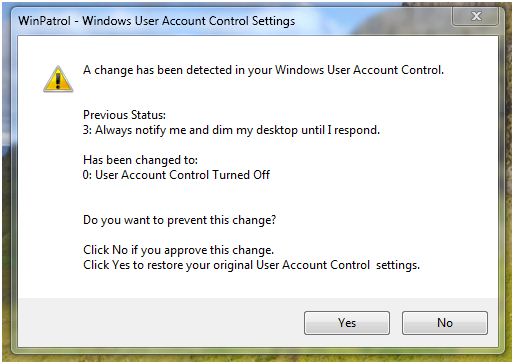
Monitors and alerts to any changes to User Account Control Settings
No matter if its malware or over jealous security programs. - Continues to have the best performance and smallest foot print of any system monitor
- Hide individual alert messages and lock settings to prevent potential errors by other computer users.
| Not Just a Single Program, Not a Bloated Security Suite. | |
|---|---|
|
WinPatrol.exe A robust System Monitor, WinPatrol will alert users to malware attacks, hijackings and critical changes made to a computer without their permission. WinPatrol PLUS includes our unique R.I.D. technology . This tiny program runs in the background without slowing you down. |
WinPatrolEx.exe As a Multi-Purpose Educational, Support Utility WinPatrol replaces multiple system utilities with its enhanced functionality. WinPatrol PLUS provides easy to understand descriptions of over 20,000 programs. This easy to use interface allows you to tweak your system and make it run at its best performance. |
After being available for over 10 years WinPatrol has a reputation for quality and for helping those in need.
1) The smallest footprint of any system monitor able to prevent critical system changes without impacting normal system performance like…
- Autorun/Startup programs & Services far beyond the easy to find programs listed by MSConfig.
- Browser Add-ons & Toolbars which may redirect web pages including default home and search pages.
- File Type associations even by legitimate programs wanting to be the default jpg or mp3 player.
- ActiveX programs that suddenly appear with no user interaction.
- Windows settings like Autoupdate preference, User Account Control and domains found in the HOSTS file.
- Decrease boot time and get yourself working faster.
- Move some autorun/startup program to WinPatrol’s Delayed Start list to speed up boot time even more
- WinPatrol will remember those annoying programs which keep coming back and remove them without interruption.
- WinPatrol shows you the most recently installed files and registry entries in a single easy to review and remove list.
- Unlike Windows Task Manager, select multiple files to kill off with a single click.
- Mark files to be deleted on reboot before they can be locked or reproduced.
- Exposes secret startup locations used by keyloggers or other programs that claim to hide.
- Even with long names available, Windows uses filenames like ctfmon.exe, svchost.exe, lsass.exe, smss.exe, etc… PLUS Info tells you why they’re important.
- When malware file names suddenly appear PLUS Info alerts users to their danger.
- PLUS Info allows users to decide if a file like QTTask.exe is really needed at Startup
WinPatrol is NOT
1. Likely to conflict with other security programs you rely on.
2. A huge drain on your system resources or performance.
3. A yearly subscription or program only designed to help if you pay to
upgrade.
4. A signature based system that relies on already identified threats.
5. A program that will update itself automatically without your knowledge.
6. Going to connect to the internet unless you explicitly request info.
7. Going to install any addition crap or toolbars on your system.
What's New
-
Recently Detected List
Extremely helpful for identifying and cleaning up malware recently added to your system, the new "Recent" tab shows files in a single list. Recent list provides a one screen look at the most recently installed and registered programs.

-
Increased background performance and reduce conflicts with other
programs.
-
Added Monitoring of UAC settings
-
Fixed truncation and missing international text
-
Windows 7
This version is the first specifically designed to work with Windows 7. If you're a Windows 7 user you're welcome to use this beta and report your experience. Many Windows 7 specific features are still being developed and may not be available until Microsoft has officially launched Windows 7.
- Hide Alerts
The 2nd big change is a long time request. Many users have wanted to configure WinPatrol so that alert messages may be hidden from users. Typically, this has been requested by IT managers or parents but it may also be handy to regular WinPatrol users. This will be a bonus feature available only to supporters who have upgraded to PLUS.
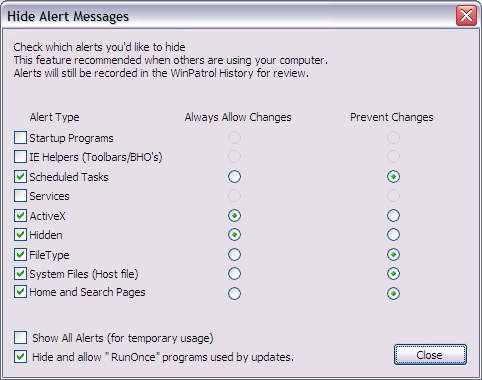
As seen on a Windows XP machine - Hide Alerts
Prior Release Notes
- WinPatrol 15.5.2008
- WinPatrol 14.0.2007
- WinPatrol 12.2.2007
- WinPatrol 11.3.2007
- WinPatrol 10.0.5.0
- WinPatrol 9.8.1.0
- WinPatrol 9.7
- WinPatrol 9.5
- WinPatrol 9.x
- WinPatrol 8.x
- WinPatrol 7.0
- WinPatrol 6.5


Copyright
© 2009 BillP Studios
All Rights Reserved.