
Version 25.0.2012.5 July 13th, 2012
* Fixed repeating Uninstall warnings.
* Repositioned text fields being cut off.
Version 25.0.2012.1 July 11th, 2012
* Fixed checkbox used to disable "Automatically run WinPatrol" option.
WinPatrol 25 Learns Lessons from Stuxnet
In recent months we’ve all noticed a change in how malware is introduced on
someone’s computer. While the most common entry point remains users making a bad
choice, the use of program vulnerabilities is used by more sophisticated
malware. The number of Microsoft vulnerabilities being exposed is actually
decreasing yet Microsoft was forced to send a number of out-of-cycle Windows
security updates last month. Non-Microsoft applications however accounted for 71.2% of
all publicly known vulnerabilities in the 2nd quarter of 2011.
There’s no Anti-Virus software available that can totally protect you from the
variety of vulnerabilities that continue to be exposed by hackers. Even
WinPatrol can’t stop all these holes but does everything possible to alert you
and help you cleanup unwanted programs. Some of the newest malware sits quietly
in the background waiting for a target. One of our goals has always been to make
sure you know what’s happening on your system. WinPatrol v25 continues to improve
its monitoring of system location required by sinister applications.
Based on the research done on state sponsored malware like Stuxnet and Flame
I’ve added two new features which have become popular methods used to hide and
disable security programs. These new features are designed to prevent programs
from hiding on your system waiting for a target before releasing their full payload.
* Uninstall Detection ( NEW! )
The new WinPatrol v25 will track programs that have been installed on your
system and will monitor the location Windows uses to store Uninstall
information. This location includes the path to the Uninstall command which is
often used by malware to remove a program silently. WinPatrol will let you know
the names of any programs which are removed. This feature is available to PLUS
only users and is optional. Legitimate alerts may occur during software updates
or when you choose to remove software.
* Start Program Removed Detection ( NEW! )
All WinPatrol users can benefit from the often requested option of Start program
removal. WinPatrol PLUS is not required to benefit from this feature.
WinPatrol was the first program to let users know if a new auto startup
programs were installed. Now WinPatrol will also let you know if another program
has removed one of your Startup programs. One of the common behaviors of malware
is to reduce the possibility of being detected by Anti-Virus or security
software. It’s common for new malware to remove programs from your auto Startup
list so it won't be detected. Since WinPatrol is not as well known as other commercial
products it's rarely a target for removal.
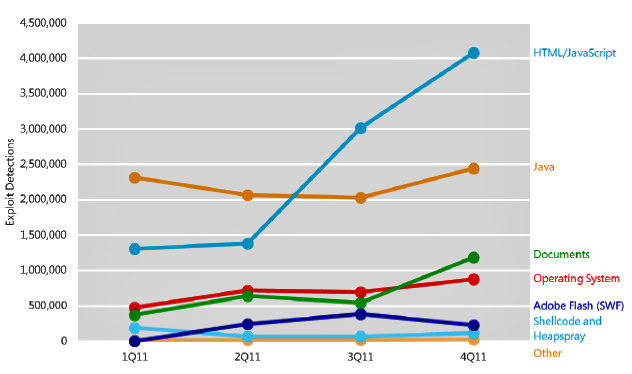
Source of recent exploits
* Delayed Startup Programs
One of our more popular features is the ability to delay the launch of a Startup
programs. This can really speed up your boot time. Our recent sale generated a lot of new WinPatrol users who helped
isolate a few bugs in Delayed Start especially on the 64 bit versions of Windows.
These bugs have been fixed so programs aren’t lost and parameters are properly
returned when moving a Delayed program back to its original status.
* Windows XP Kill Task
This bug only affected XP users and even reverting to our v18 code didn’t
resolve a flaw preventing WinPatrol from killing tasks. It turns out Microsoft
changed the value of one of the parameter masks used in a function called
OpenProcess. The Kill Task function broke on XP after we updated to newer Microsoft
tools in our efforts to better support Windows 7. Sorry to the XP folks that it
took this long to find. I can't thank Larry from Microsoft enough for his assistance.
This is an important feature because unlike Task Manager, WinPatrol allows you to select
multiple programs to kill with one click.
* Company Name, Details and Correct Path
One of the first steps in detecting a suspicious programs is the lack
of a company name in its resource. On Windows 64 bit machines not all of the
details of programs were available due to a bug I found and reported to
Microsoft. It turns out a common Windows function called
ExpandEnvironmentStrings won’t always providing the correct path when represented
by the environment variable %programfiles%. If you’re using Windows 64 bit you
probably noticed there is a "C:\Program Files" path for 64 bit programs and older
programs are stored in "C:\Program Files (x86)". A correct path to your program is
required to obtain details like a company name. We’ve worked around this bug so we can find
the correct path which is required for company name and many other features.
.
* Misc Fixes
Anyone who noticed Scotty's ability to run on startup was sometimes missing will be pleased. There was
in fact a bug that removed WinPatrol as a Startup program. It wasn't caused by other programs, just programmer
stupidity.
* Remaining Bug
There's a weird bug that some folks have experienced where Scotty just randomly barks for no reason.
It's been around for years and still remains. Usually reinstalling WinPatrol fixes the problem. If you experience this
bug you can help us narrow down the reason for this barking by using a little known feature in WinPatrol.
In the Windows Control Panel you'll find an applet that allows you to customize sounds in programs which take advantage of
this option. Near the end of the list of applications you'll find WinPatrol and you can assign different sound files
to the different kind of WinPatrol alerts. Instead of our barking sound you can assign any sound you have available on
your system. This feature was created for our legally blind supporters. By assigning a different sound to our alert types
you can help us narrow down the type of alert which is occurring when Scotty barks but doesn't display a message.
Why You Need WinPatrol
If you’ve wondered why you need WinPatrol just read what Microsoft has
discovered in their malware research. “In the fourth quarter of 2011
alone, Conficker was detected on 1.7 million systems worldwide”
This infection is still increasing even though it’s well known to all popular
security programs and simple Windows security updates will prevent it from
spreading.
You need extra help and WinPatrol is still designed to monitor locations
ignored by traditional security software. Contrary to what they might read you from a support script,
WinPatrol works and plays well with others. You can run WinPatrol along side your favorite Anti-Malware
package and you'll never detect any difference in performance.
Source:
Microsoft
Security Intelligence Report
Process Security and Access Rights
 Download WinPatrol 25.0.2012.5
Contact support@WinPatrol.com
|
Not just a Single Program, yet not a bloated Security Suite. |
|
WinPatrol.exe
A robust System Monitor,
WinPatrol.exe will alert users to malware attacks, hijackings and critical changes
made to a computer without their permission. WinPatrol PLUS includes our unique
R.I.D. technology which works much differently than other similar
programs.
This tiny program runs in the background without slowing you down. Scotty works
and plays well with others so you won't find conflicts with other security based
programs. WinPatrol was developed in Microsoft "C" and Assembler to stay small
and fast.
|
WinPatrolEx.exe
As a Multi-Purpose Educational, Support Utility
WinPatrol Explorer replaces multiple system utilities with its enhanced functionality.
You'll no longer need programs like MSConfig or Services.msc.
WinPatrol PLUS provides easy to understand descriptions of over 30,000
programs. This easy to use interface allows you to tweak your system and make
it run at its best performance.
If you're at all curious about what's going on inside your computer this
component will let you know.
When you click Close to exit our main tabbed interface it leave memory
completely leaving only our small WinPatrol.exe monitor. |
 WinPatrol Screen
Shots & Images
WinPatrol Screen
Shots & Images
 WinPatrol User
Feedback
WinPatrol User
Feedback
 Compare WinPatrol FREE
vs. PLUS
Compare WinPatrol FREE
vs. PLUS
Supporting the National Network to End Domestic Violence
Top Ten Reasons to Try WinPatrol
Prior Release Notes
| 


