
WinPatrol™2013
v28.1.2013
April 26th, 2013
Thanks to your support,
Work Continues on New Versions of WinPatrol
WinPatrol 28.1 Update
This update provides enhancements and fixes to version 28.
Allows WinPatrol to start for current user or all users.
Reduced monitoring during all sleep states to save battery usage.
Fixed Reset function to remove duplicate Scotty icons.
Fixed Reset function to remove duplicate Uninstall entries.
Speeds up real-time detection.
Fixed bug in system tray icon behavior that could have produce unknown results.
Improved handling of repeating changes made by partner programs.
Fixed "Automatically Run WinPatrol..." option so it doesn't always launch on boot
* WinPatrol Maintenence and Reset Tool
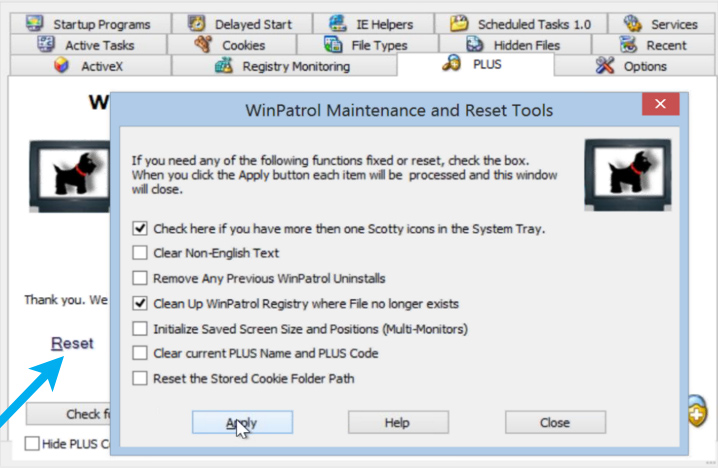
Under the PLUS tab, you'll find About/Version information along with your way to activate WinPatrol PLUS
once you purchase a lifetime Name and PLUS code. You'll also find a search box so you can look up PLUS Information on
files even if they aren't found in any of your lists. This can be used when you want to help a friend
find out more about a mystery file on their computer.
There's also a "Reset" link previously used to initialize the PLUS name and code. The clickable Reset link has been
expanded to provide useful tools created based on email questions from WinPatrol users.For details on each tool the help button will open the following information...
https://www.winpatrol.online/support/reset.html
* Windows Services - Automatic (Delayed Start)
One of the possible startup values for Windows Services is Automatic but with Delayed Start.
WinPatrol now supports versions of Window and displays the Delayed Start option
when available WinPatrol also allows Services to be managed so you can include
this option when appropriate.
* User Interface Improvements
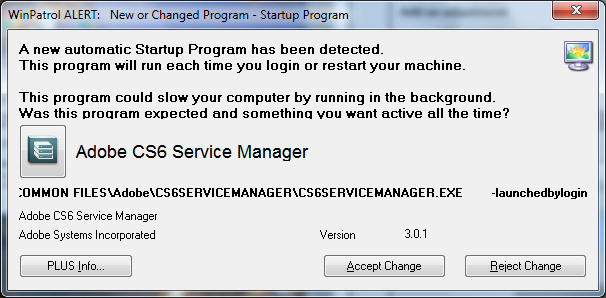
Alert screens have been updated to be less annoying and provide most effective information. Readability has been improved with icons moved to the right side and
some buttons have more descriptive text. Nobody likes alert windows and under
normal use you'll never see an Alert message. When you do, WinPatrol will help
you decide if a change is required and do what it can to reduce repeating
alerts. We've found that 8 out of 10 programs which fight efforts to be removed
from the Startup list are legitimate programs, usually designed to provide
dangerous automatic updates.
* Registration Improvements
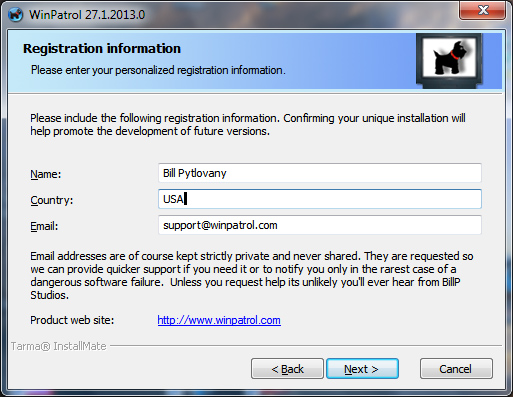
When installing WinPatrol you'll be asked to supply your name, country and email.
This information is used for statistical reasons to help BillP Studios understand the rate WinPatrol is installed, how
installations react to promotions and especially how we can make WinPatrol PLUS the best possible value. Your name and
email is used as a unique identifier and also helps to quickly find any requested PLUS codes that may be lost..
Anyone concerned about privacy didn't have to provide their
truthful information but still had to fill in the form to continue..
Even though it's a standard practice to request registration for free software we don't want to alienate any fans of WinPatrol.
Version 28.0 found a new way to provide the same statistics without requiring a name or
Email. All registration information is now optional.
* Improved Handling of Invalid Filenames
When programs are uninstalled poorly there can often be left over characters or spaces that
frequently trigger WinPatrol alerts that contain no information. This version reduces the possibility
of corrupted filenames.
Better Display when File Does Not Exist
Much of the information displayed by WinPatrol comes from registry and our goal is to
let users see what's in the registry without having to know how to use regedit.exe. In some cases,
programs have been registered but the file no longer exists. Often other security software removes the file
but doesn't update registry pointers. This version make it more obvious when a file no longer exists and is
no possible threat.
 Download WinPatrol 28.1.2013
Contact support@WinPatrol.com
 WinPatrol Screen
Shots & Images
WinPatrol Screen
Shots & Images
 WinPatrol User
Feedback
WinPatrol User
Feedback
 Compare WinPatrol FREE
vs. PLUS
Compare WinPatrol FREE
vs. PLUS
Supporting the National Network to End Domestic Violence
Top Ten Reasons to Try WinPatrol
Prior Release Notes
| 


