Your feedback has made this the first in a more aggressive release schedule.
Instead of waiting to find a number of fixes or new enhancements we're now on a monthly update cycle that will
allow every new version to have improvements.
Each update will include minor enhancements and changes that fix or improve current functionality.
WinPatrol 28.9 Update
Microsoft has made great advancements in security yet machines continue to fall
victim to attacks, suffer from poor user choices and receive unwanted programs
included with legitimate software. WinPatrol considers security essential but
also provides the knowledge needed to configure systems to run at optimal
performance. Features are designed for both experts and users with little
understanding of computers.
Disable Bug Fix 28.8.
As sometimes happens when you add one feature you break another.
For anyone who installed WinPatrol 28.8 on a non Windows 8 system the "Disabled" status of startup programs is now
being displayed propertly. This version 28.9 will fix that problem.
(All Users)
Update Notification.
Ironically one of our new fixes relates to
text on our PLUS screen that lets you know
when a new version is available. By popular demand WinPatrol will now send a message letting you know when a new build
is available. When this notification is displayed we also change the text on the PLUS screen to remind you.
Unfortunately, the text didn't always reset after you upgraded to the new version. This version will resolve that issue.
(All Users)
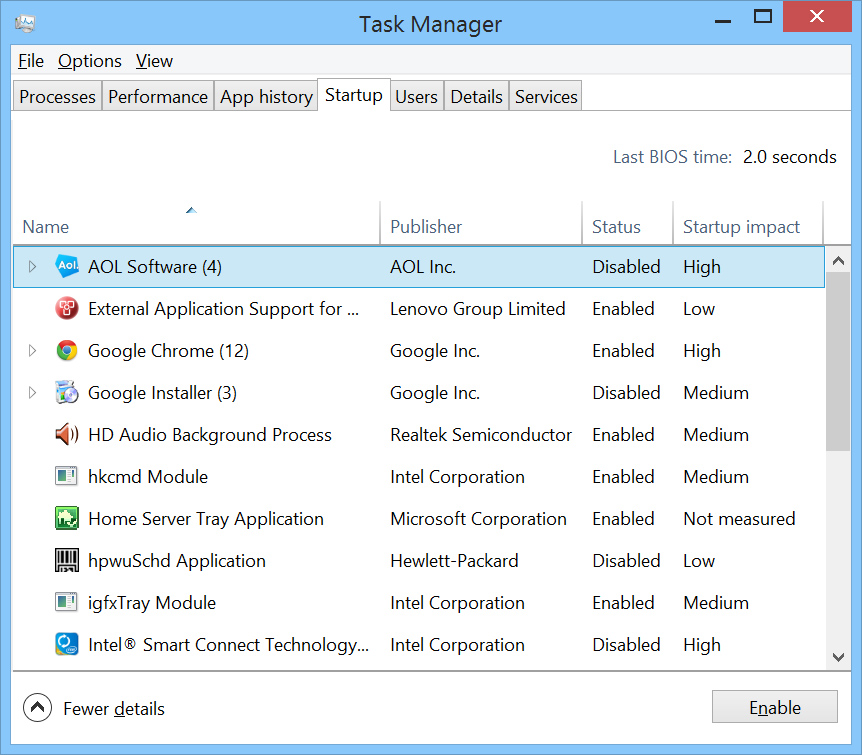
Windows 8 Task Manager.
Instead of using MSConfig, Windows 8 includes a list of Startup programs as a tab in the new Task Manager.
Users can disable startup programs using the Windows Task Manager.
While WinPatrol's "Disable" feature includes additional features it now recognizes
choices made by the Task Manager and will alert Task Manager when files are disabled by WinPatrol.
As in the past WinPatrol will monitor programs which are disabled so if they are forced back to normal by a partner program,
WinPatrol will automatically reset them to disabled unless you click to Enable the program.
(Windows 8 Only)
Installation Program Update.
The WinPatrol setup program will no longer launch regedit as
part of the install process. In the past, regedit was used to set some useful examples on how to use the feature
that allows WinPatrol to monitor any registry location. Launching regedit was not acceptable to some secure systems
and with so many different versions of Windows not all of our examples were useful on all platforms. A help file is still
easily accessible on the Registry Monitoring tab.
(All Users during setup. PLUS required for custom registry monitoring.)
Windows XP Enhancement..
As part of our dedication to XP users we've improved performance that can sometimes be
affected by large Temp Internet Folders or hard drives with little space. Even if you don't use Internet Explorer unrelated quirks can sometimes
occur when the temp file grows too large.
For more information on healthy temp files reading
Free #1 Tweak to Improve Windows Performance
While for safety we recommend XP users upgrade to Windows 8 before the
end of support from Microsoft next April, WinPatrol will continue to detect changes including zero-day
infiltrations on Windows XP systems.
(Windows XP SP2 & SP3 and Windows Vista users.)
 Download WinPatrol 28.9.2013.1
New Social Engineered Community Database
Click Here to browse.
Previous 28 Upgrades
Prior Release Notes