
WinPatrol™
v29.2.2013
December 9th, 2013
Quick Fixes
- Fixed false warnings about changes to Windows AutoUpdate status
- Reduced warnings of daily Microsoft updates that created Uninstall warnings
Artificial Intelligence Security
- This new feature will increase WinPatrol's value exponentially over time. It will also be
accessible for our future apps like Task Catcher "Extreme" and other partners interested in
licensing the technology. Unlike the Optional sharing of choices used on our Community Info pages, all A.I. Security data is kept private on your
machine.

Phase 2 including focus groups and beta testing of Task Catcher Extreme will be restricted to current Task Catcher customers and/or BillP Studio Associates who agree to a strict NDA.
Our WinPatrol-powered A.I.S. provides the 3rd generation of innovations created by BillP Studios
to detect and stop dangerous new threats without crippling your computer.
We believe a passive approach can still be used to detect and shut down instant attacks like Cryptolocker.
We're seeing a trend in threats that remain in memory instead of becoming resident in the Windows registry or hard drive. These attacks will not
be detected by most traditional Anti-Virus programs.
Improvements and Bug Reports
- Semi-Transparent Alert messages available on Windows 8 make Scotty less intrusive.
- Manifest file updated to support presistant WinPatrol window size and positions when using alternate DPI settings.
- Improvements to our Active Task List and more success Killing of active tasks using multi-selection standards.
- Introduction of new triggers to increase performance by reducing redundant monitoring(PLUS Only)
- Improved performance of change detection on our free version.
- Improved screen UI and description when a change is detected for the Windows Update settings.
( Did you know WinPatrol monitored changes to the Windows Update? )
- The default setting for File Explorer integration is now disabled. It's been pointed out that a large number of programs
taking advantage of the right-click context menu wthout asking. We also don't want to seem like we're nagging users to upgrade to
WinPatrol PLUS.
 Download WinPatrol 29.2.2013
October 19th, 2013
v29.0
Power to the People
Your comments and suggestions have helped create one of the most exciting new versions in recent years.
Over the years WinPatrol had grown with the ability to detect a large range of internal changes within Windows.
In the process, WinPatrol lost its easy to use feel that encouraged you to tell your friends and family to download our program.
Version 29, built on your feedback, returns WinPatrol to its roots and will have you blogging and tweeting by the end of the week.
One complaint I've heard, especially from new users, is the volume of alert messages when there is a new program install or malware attack. Over the years, the number of critical locations monitored by WinPatrol has grown but it’s also a source of frustration.
While everyone appreciates WinPatrol alerting them to an infiltration,
the number of locations we reveal combined with numerous malware pop ups is overwhelming.
Installing a legitimate program will typically cause new entries in the Startup Programs, an IE Helper or
two and multiple Services. A malware attack may create 10 times the changes all generating individual
warnings from WinPatrol. Instead of having to respond to each change most of us would rather just have everything
fixed with a single action. That’s WinPatrol v29.
The new version will save users from as much frustration as possible and includes new options when unexpected
changes occur. Based on a single user response, WinPatrol will evaluate a response to other immediate changes
without requiring extensive user interaction.
More Options when you need them.
WinPatrol v29 has added new clickable links on our alert screens.
Open Folder and Properties features are currently available by right-clicking on a filename in our main tabbed interface.
More than one user has pointed out how useful this information would be when an initial alert appears. Disable is also
available on our main interface and now can be used immediately to tell WinPatrol you never want this change to occur.
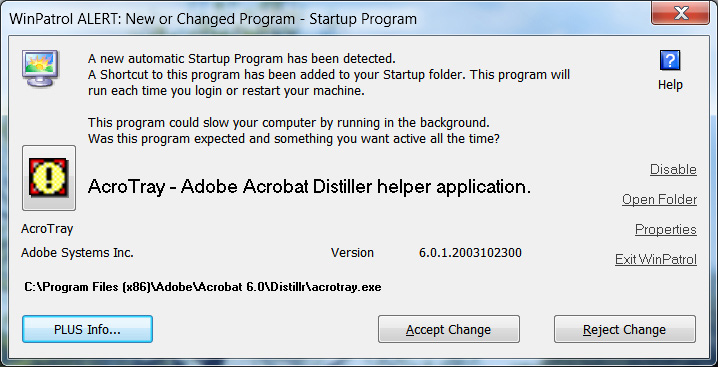
Hopefully, the Exit WinPatrol won’t be needed now that we’ve added our other new feature but based on the panic I
sometimes read I thought folks would appreciate an emergency exit.
Simple Question: Did I install this program?
My goal is to offer a single alert with all the information you need to know if you’ve installed a useful program or
you’re under attack. You'll receive a single screen with information to help you decide. Were you installing something new?
Were you visiting new websites? Did you click on a link and wish you hadn't?
If you know the answer WinPatrol will fill in the blanks and let you decide if it's safe to continue or if you've been attacked
by malware that found a hole in some software already on your computer.
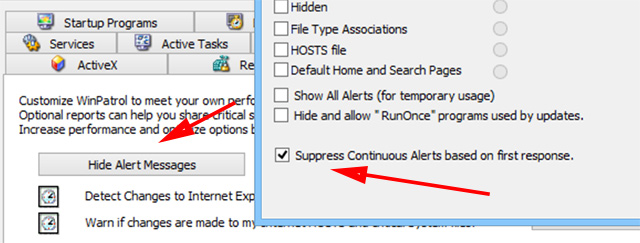
Naturally, this new feature can be turned off but it will default to the more friendly, and usable
status. If you'd like to see messages for every change uncheck the "Suppress alert" box under Options, "Hide Alerts".
This power feature is available for WinPatrol PLUS user.
Feedback indicates that most people don't need to know every detail. They just want it fixed. Any changes will
continue to be stored under the History button so any unwanted change can be restored.
I hope this enhancement will be welcomed and perhaps generate interest again from past WinPatrol fans. I am confident
it will be accepted by anyone new to WinPatrol and allow them to continue using WinPatrol so they can discover all its power.
Additions Enhancements and Bug Fixes
Added New Features to Start, IE Helper and Service Alerts
- Added Properties information directly from Windows
- Added Open Folder launching Windows File Explorer to allow user direct access to new file.
- Added Exit Windows emergency exit in case new users are confused or had WinPatrol installed without their knowledge.
- Include Disable feture to new Startup Program alert message. This tells WinPatrol to keep track of this file and
always remove it anytime it is put back into the startup list.
Reduce font size for dialogs that display long path names.
Confirm MS Shell Dlg font is used to support international system fonts
Adjust fonts to provide better handling when resizing main interface
Change default position of alert message to upper right corner to be less obstuctive
Detect signature file updates without warning McAfee users every day.
Confirm all types of changes are checked at the same time when any single change occurs.
Allow suppression of multiple alerts during Real-time Infiltration Detection
New Social Engineered Community Database
Click Here to browse.
Previous Upgrades
Prior Release Notes
| 


