|

What's New
-
WinPatrol's popularity and the
great feedback from users has encouraged the addition of some brand
new features. We've found a few bugs that were taken care of but
we've also worked hard to make WinPatrol use less memory and system
resources. No matter how powerful your machine is or isn't, you
can confidently have WinPatrol active without ever affecting the speed of
other programs.
Since everyone with BillP Studios uses WinPatrol
daily it wasn't hard to come up with a few new features that would
enhance the usefulness of our program. We also listened carefully to all your requests.
• Always eat this Cookie List
Carl from the Nederland's asked...
"It would be nice if I could create a list of cookies that are always deleted without bothering to ask
me"
-
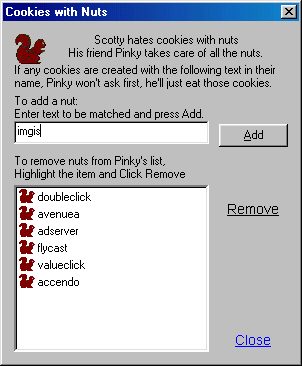
You got it Carl! Since Scotty doesn't
like cookies with nuts we refer to this list of Unwanted Cookies as
Nuts. WinPatrol introduces Pinky the Squirrel
who will help you keep track of
these unwanted cookies.
On WinPatrol 3.0's Cookie
page you'll find a new button called Nuts
. Clicking on the Nuts button will take you
to list of cookies, which aren't welcome. This will be a good place to
handle for cookies like DoubleClick which always seem to pop up.
Just type in DoubleClick or other identifying text into the Nuts dialog
and press Enter or click the Add button. As you find more annoying
cookies, just add them to your list of nuts.
Domain Info interface fix
Tim from Dulles, VA said...
"I should be able to just enter a domain.com and press Enter on the Domain Info page to look
up a web site"
- Sorry it took so long Tim, but it works now just like you'd expect
it.
Kill Active Tasks
Mike from NYC, NY said...
"I'd like to be able to shutdown certain tasks from WinPatrols list like I can using Ctrl-Alt-Delete"
- Another good choice. Windows 2000/NT doesn't support full Task lists but it works great with Windows 95/98.
Not every task will die gracefully so this feature isn't for just closing programs. It's perfect for
situations where you detect a suspicious program you want to remove immediately.
International Language versions
Chris from Germany asked...
"Any chance of localized version of WinPatrol for all your fans in Europe?"
- WinPatrol 3.0 supports Dynamic Local Interface Processing developed by BillP Studios. In the future,
as DLIP files are created for each language they will be made available online. DLIP files can be used and interchange regularly
without any updates required to WinPatrol 3.0.
Authenticode Security
Some cautious people asked...
"Who are you and How do I know it's safe to download WinPatrol?"
- Information on BillP Studios including our physical address is available at
http://www.billp.com/about.html.
To make everyone even
more comfortable, WinPatrol 3.0 setup has been signed with
Microsoft AuthenticodeTM Technology and contains a Digital ID
from VeriSign, Inc.
 Click to download WinPatrol 3.0
Copyright ©
1997-2002 BillP Studios
All Rights Reserved.
Published Copyright Date 11/19/97

|


